
Form within the web portal
Please use the 'Submit a request' link that appears near the top right of every screen within the Support Portal. The required fields are flagged with a red asterisk. Please provide as much information as possible on the ticket. You can add attachments as supporting information where appropriate.
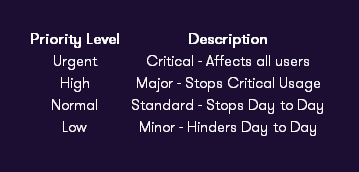
Priority details below:
The same email address applies, support@trailight.co.uk. As with requests logged via the web interface, you should include all necessary detail to enable the Service Desk Consultant to investigate the issue effectively. Unlike the web form, raising a ticket via email does not allow the requester to set certain ticket properties, however, if detailed within the email the Service Desk Consultant can populate the applicable fields (bulleted below) once the ticket has been received.
- Priority (Please refer to your Service Level Agreement for information regarding the use of these fields)
- Address (URL)
- User/users affected by this issue
- Description of the issue
Once your e-mail has been received, a ticket will be created (with any attachments) and a ticket reference number returned as a reply to your original message.
Please Note - If the requested ‘ticket properties’ have not been provided within the email, we may not be able to prioritise your request.
Phone - +44 (0)843 309 2088
Please feel free to call through to the Service Desk where we will be happy to talk through the issue and raise a ticket on your behalf.
Comments
0 comments
Please sign in to leave a comment.